
Browse articles
- Getting started
- Project finances
- Billing by the hour
- Practice finances
- Grouping fees
- Budgeting project costs
- Claim an expense
- Recording revenue entries
- Recording project expenses
- Purchase orders
- Approving expenses
- Going further
- Construction cost fees
- Recurring fees
- Billing expenses
- Contingencies and discounts
- Billing progress claims
- Project templates
- Overheads
- Getting started
- Billing milestones
- Sending an invoice
- Billing logged time
- Month-end invoicing
- Fee proposal templates
- Writing a fee proposal
- Getting a proposal signed
- Link invoices that are already in Xero
- Going further
- Payments and overdue invoices
- Connect your accounting system
- Fee groups on invoices
- Tax codes and accounts
Billing progress claims
Calculate a stage claim from a hidden Previous Claims driver so the formula bills only the new amount.
What you'll achieve
Bill a fee progressively across stages so each claim is the net new amount, never a repeat of what's already billed.
You'll end up with: A hidden Previous Claims driver and a Stage Claim formula that resolves to the net new amount.
Before you start
Price the work: if your contract bills in progress claims, each claim is the agreed fee less what you've claimed. You'll know it worked when claims add up to the agreed fee and no more.
Progressive billing has one essential calculation: cumulative value earned to date minus the amount already claimed. If Concept Design has earned fifty thousand dollars and earlier claims covered thirty thousand, the next claim is twenty thousand.
Give the subtraction two named inputs
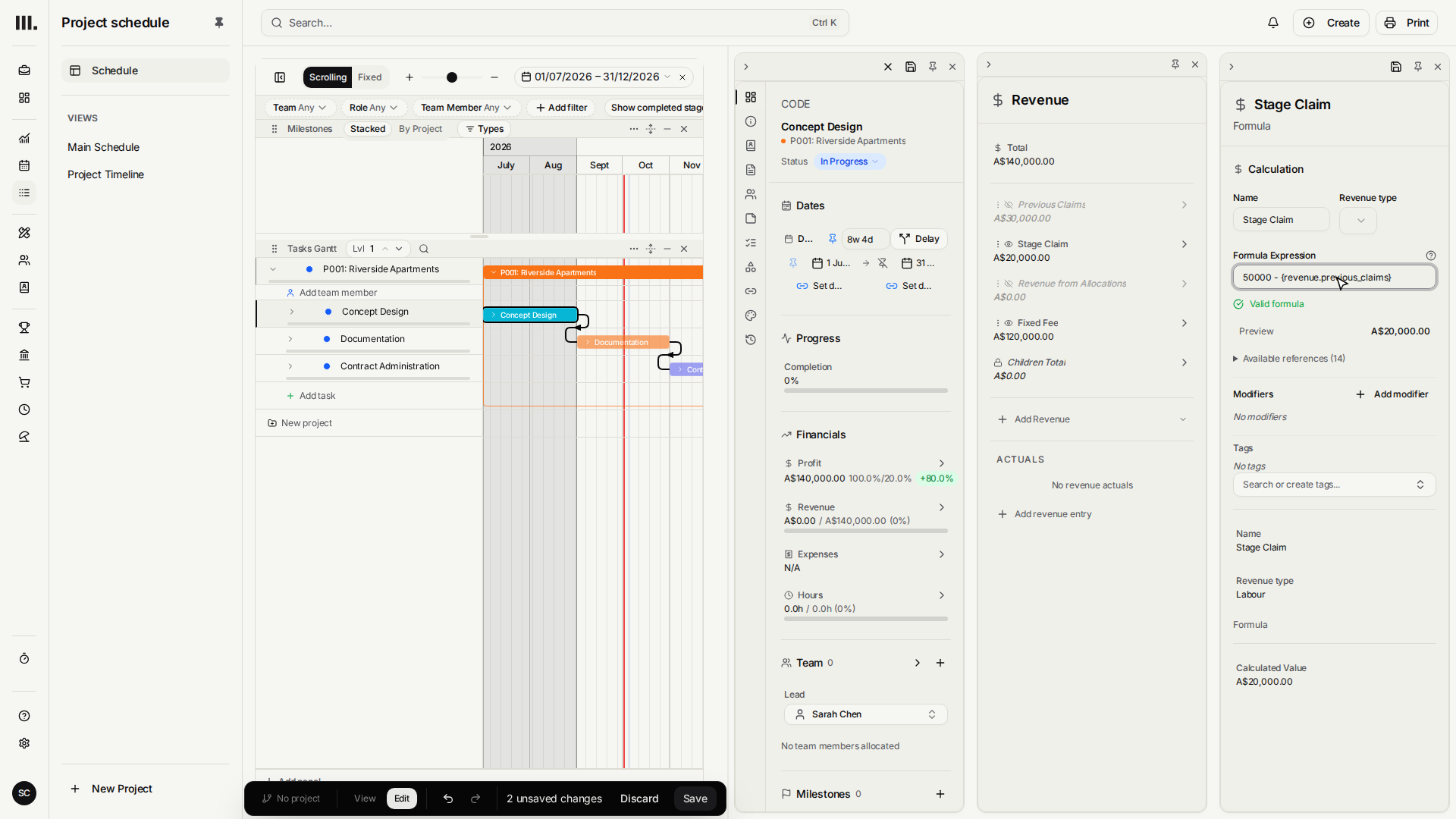
On Riverside Apartments, Previous Claims is a hidden Fixed Amount. It stores the thirty thousand dollars already billed but does not appear in revenue totals. Stage Claim is a Formula that references that sibling by name:
50000 - {revenue.previous_claims}
This is clearer than a negative modifier because the formula states exactly which value it subtracts. Renaming the sibling updates the relationship through Monument's formula model.
- 1
Open Concept Design's Actual revenue and close the eye on its Fixed Fee: the claims replace it.
- 2
Click Add revenue item, choose Fixed amount, and add Previous Claims for thirty thousand dollars.
- 3
Close the eye on Previous Claims, so it drives the calculation but is never billed twice.
- 4
Add a Formula named Stage Claim and enter 50000 - {revenue.previous_claims}.
- 5
Save. Stage Claim resolves to twenty thousand dollars, only the amount that is new.
The sibling formula does not read invoice history. Update Previous Claims when another claim goes out. If you need automatic billing history, use the invoice's Progress and Prev. Billed lines or plan billable milestones.
Troubleshooting
- Previous Claims appears in revenue totals. Close its eye. It is a driver, not a second fee.
- The formula cannot find the sibling. The name becomes a lower-case underscore reference, so Previous Claims is
{revenue.previous_claims}. - The same amount is deducted again on the invoice. Choose one layer to net previous claims. Do not apply the sibling formula and a separate Prev. Billed deduction to the same amount.
- A negative result displays as zero. Check the cumulative value and previous claims. A genuine amount owed back to the client needs a credit, not a negative claim.
Where this fits next
Next, budget what the work costs. When the claim is ready, create and issue an invoice.
Related articles
Search Monument help
Search help articles and open a result.